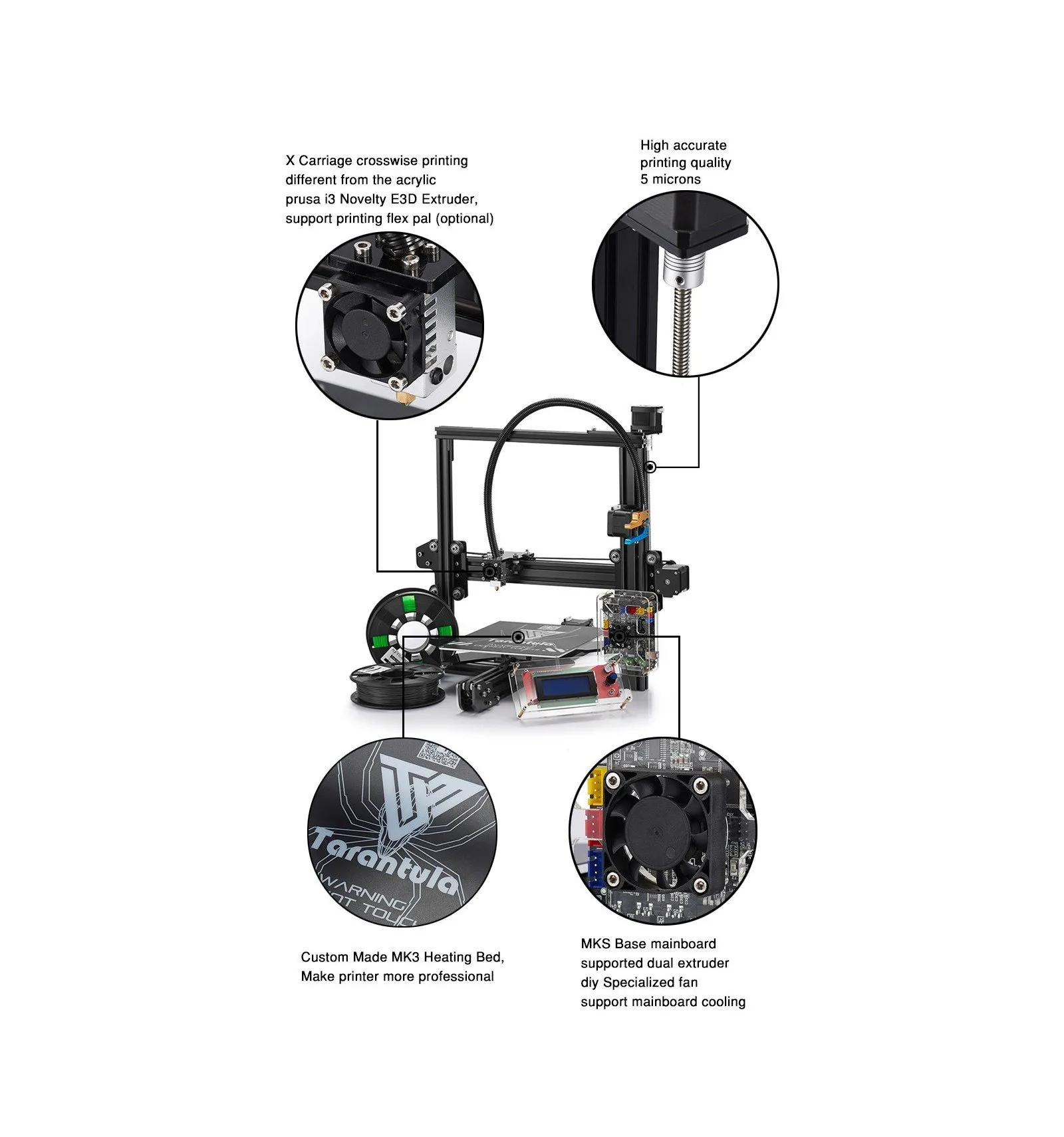
Tevo Tarantula Prusa i3 Basics
The Tevo Tarantula Prusa i3 is a popular and affordable 3D printer, beloved by hobbyists and beginners alike. Its open-source design and relatively simple construction make it an excellent entry point into the world of 3D printing. This guide aims to provide comprehensive information to help owners of the Tevo Tarantula Prusa i3 get the most out of their machines, from initial setup to advanced troubleshooting and upgrades. Whether you’re a complete novice or have some experience with 3D printing, this guide will walk you through the essential aspects of owning and operating this printer. The Prusa i3 design, known for its reliability and ease of use, has been adapted by Tevo, offering a cost-effective option for those seeking to explore 3D printing.
Understanding the Tevo Tarantula Prusa i3
Before diving into the specifics, it’s crucial to understand the fundamental components and how they work together. The Tevo Tarantula Prusa i3, like most Fused Deposition Modeling (FDM) 3D printers, operates by melting plastic filament and depositing it layer by layer to create three-dimensional objects. This process involves precise control of temperature, movement, and material extrusion. The printer’s open-frame design provides easy access for maintenance and modifications, making it a versatile machine for various projects. Understanding the core mechanics will help you troubleshoot issues, optimize print quality, and perform upgrades. The machine’s design allows users to modify, customize, and enhance their printer’s performance and capabilities, promoting a strong community of users who share knowledge and expertise.
Components of the Tevo Tarantula Prusa i3

The Tevo Tarantula Prusa i3 consists of several key components that work in harmony. Knowing these components is key to assembly, troubleshooting and maintenance. Each part plays a vital role in the printing process, so understanding their functions will greatly improve your 3D printing experience. The printer’s efficiency and printing quality depends on the proper functioning of these parts.
The Frame and Structure
The frame provides the structural integrity of the printer, supporting all other components. It’s typically made of aluminum extrusions, offering a sturdy base for the moving parts. Ensuring the frame is square and stable is critical for print quality, as any misalignment can lead to issues such as layer shifting or uneven prints. Regularly check the frame’s screws and connections to maintain its stability. A well-built frame minimizes vibrations and ensures the printer operates smoothly, delivering more precise and consistent results, contributing to overall print quality and the lifespan of the printer.
The Extruder and Hot End
The extruder is responsible for feeding the filament into the hot end, where it is melted and extruded onto the print bed. The hot end includes a heater block, a nozzle, and a heat break, all working together to melt and dispense the filament. Regular maintenance includes cleaning the nozzle and ensuring the hot end is properly assembled to prevent leaks and clogs. The extruder’s performance directly impacts the quality of your prints; an efficient extruder ensures consistent filament flow, resulting in better layer adhesion and detail. Different nozzles can be used to change the print quality and detail, as well as print speed.
The Heated Bed and Printing Surface

The heated bed provides a stable surface for the first layer of your prints to adhere to. It’s crucial for preventing warping, especially with materials like ABS. The printing surface can vary, from the original build plate to options like glass or PEI sheets. Proper bed adhesion is vital for a successful print. Ensuring the bed is level and clean, along with using the appropriate adhesive (such as glue stick or hairspray), can dramatically improve print quality. Regular bed leveling and proper surface preparation are essential for consistent prints. The heated bed helps ensure that the print adheres properly to the bed, which can otherwise lift during the printing process.
Getting Started with Your Tevo Tarantula Prusa i3
Setting up your Tevo Tarantula Prusa i3 for the first time involves several steps. The assembly process, while potentially time-consuming, is a great opportunity to become familiar with the printer’s components and how they fit together. Careful attention to detail during this phase is essential, as it sets the foundation for future printing success. Following the assembly guide provided by Tevo is highly recommended, but many online resources are also available to offer additional support and clarify any confusion. Once assembled, the printer must be calibrated and configured to ensure optimal performance. Proper setup can prevent common printing issues.
Assembly Guide for Beginners
The Tevo Tarantula Prusa i3 often comes in a kit form and requires assembly. Start by organizing all the parts and components according to the manual. The process typically involves attaching the frame, assembling the X, Y, and Z axes, and connecting the electronics. Take your time and carefully follow the instructions, as incorrect assembly can lead to printing problems. Reviewing online tutorials and videos can be helpful if you get stuck. After the mechanical assembly is complete, connect the electronics, ensuring all wires are properly routed and secured. Double-check all connections before powering on the printer. The assembly phase provides a unique opportunity to learn about the internal workings of the printer, contributing to the users overall understanding of the technology.
Initial Setup and Calibration

After assembly, the printer needs to be calibrated to ensure it functions correctly. Calibration involves leveling the bed, setting the Z-offset, and configuring the firmware. These steps are crucial for achieving good print quality. Bed leveling ensures the nozzle is the correct distance from the print bed across the entire surface. The Z-offset sets the distance between the nozzle and the bed. Incorrect settings can lead to poor bed adhesion or nozzle scraping. Firmware configuration might involve adjusting settings such as steps per millimeter. Following the calibration steps in the manual carefully will prepare your printer for printing. Calibration ensures that the print bed is level and that the nozzle is the correct distance from the print bed. This is crucial for getting the first layer of your prints to stick properly.
Leveling the Bed
Bed leveling is a fundamental step in the calibration process. There are several methods, including manual leveling using the adjustment screws on the bed and assisted leveling using an auto-leveling sensor. Manual leveling involves adjusting the bed screws until the nozzle is the right distance from the bed at each corner. Assisted leveling uses a sensor to automatically measure the bed and adjust for any imperfections. Consistent bed leveling is key to ensuring the first layer of your print adheres correctly to the bed, minimizing the risk of warping or detachment during the print. Leveling the bed ensures that the distance between the nozzle and the bed is consistent across the entire printing surface.
Setting the Z-Offset
The Z-offset is the distance between the nozzle and the bed when the Z-axis is at its home position. Setting this correctly is vital for the first layer adhesion. If the Z-offset is too high, the filament will not stick to the bed; if it’s too low, the nozzle may scrape against the bed. The Z-offset can be adjusted through the printer’s control panel or by modifying the firmware. Fine-tuning the Z-offset can improve the quality of your prints. This adjustment ensures that the initial layer of filament is properly squished onto the bed for good adhesion. Correct Z-offset ensures the extruded filament properly adheres to the print bed.
Slicing Software Configuration

Slicing software converts 3D models into instructions that the printer can understand. Popular options include Cura, PrusaSlicer, and Simplify3D. Configuring the slicer involves setting parameters like layer height, print speed, temperature, and infill density. These settings significantly impact the print quality and printing time. The slicer creates G-code files, which are then sent to the printer. Proper slicer configuration is essential for translating your 3D model into printable instructions. Each slicer has its own set of features, but the fundamental parameters such as layer height, print speed, and temperature settings will need to be defined to prepare your print.
Choosing the Right Filament
Choosing the right filament is essential for successful 3D printing. Various materials are available, each with unique properties and applications. Understanding the characteristics of different filaments will help you select the appropriate material for your project. The common filaments used with the Tevo Tarantula Prusa i3 include PLA, ABS, PETG, and TPU. Each filament type has different properties, so choose wisely based on the project requirements. The filament you choose dictates the properties of the final product, from flexibility to strength and temperature resistance. Choosing the proper filament is crucial for successful and efficient printing, affecting both print quality and the printer’s durability.
Popular Filament Types
PLA (Polylactic Acid) is a popular choice for beginners due to its ease of use, low printing temperature, and minimal warping. It’s biodegradable and suitable for various applications. ABS (Acrylonitrile Butadiene Styrene) offers higher strength and temperature resistance. It’s often used for functional parts, but requires a heated bed and can be prone to warping. PETG (Polyethylene Terephthalate Glycol) is a versatile material that combines the benefits of both PLA and ABS. It offers good strength, flexibility, and chemical resistance. TPU (Thermoplastic Polyurethane) is a flexible material ideal for printing items like phone cases and flexible parts. The characteristics of each filament dictate the best applications for their use.
Filament Storage and Handling

Proper filament storage is crucial for maintaining its quality and preventing printing issues. Filament can absorb moisture from the air, leading to problems such as bubbling and poor print quality. Store your filament in a dry, airtight container, and consider using desiccant packs to absorb any moisture. When not in use, keep the filament spools sealed. Handling the filament carefully will prevent tangles and damage. Storing filament properly ensures that the material remains dry and ready for printing. Keeping the filament stored correctly ensures that the quality of your prints are not affected by external factors.
Optimizing Print Settings
Optimizing print settings is key to achieving high-quality prints with the Tevo Tarantula Prusa i3. This involves adjusting temperature, print speed, layer height, and other parameters within the slicing software. Experimentation and fine-tuning are essential to finding the optimal settings for each filament type and project. Understanding the impact of different settings will help you improve print quality and resolve common issues. Print settings affect the quality, strength, and appearance of the printed objects. The goal is to achieve high-quality prints by optimizing settings that can improve the final product, and speed up the printing process.
Temperature Settings for Various Filaments
The ideal printing temperature varies depending on the filament type. PLA typically prints between 190-220°C, while ABS requires a higher temperature, usually around 230-250°C. PETG and TPU also have specific temperature ranges. Consult the filament manufacturer’s recommendations for the best results. Temperature settings are crucial for melting the filament properly and ensuring good layer adhesion. Incorrect temperatures can lead to issues such as under-extrusion, stringing, or poor layer bonding. Experimenting with temperature settings is often needed to find the optimal value for your printer and filament. The correct temperature ensures the filament melts and bonds properly for strong, high-quality prints.
Print Speed and Layer Height

Print speed and layer height significantly affect print quality and printing time. A lower print speed generally results in higher print quality, especially for detailed parts. Layer height determines the vertical resolution of your prints. A lower layer height results in smoother surfaces and finer details but increases print time. Finding the right balance between speed and quality is essential. The appropriate print speed and layer height must be selected for each project based on its complexity and desired quality. Print speed and layer height parameters directly impact the print quality and how fast the model is made. Experimentation is crucial to finding the optimal balance.
Retraction Settings
Retraction settings control the movement of the filament when the nozzle moves between different parts of the print. Proper retraction settings can reduce stringing and oozing. Adjusting retraction distance and speed helps to minimize these issues. Stringing occurs when the filament continues to ooze out of the nozzle while moving. Retraction pulls the filament back to prevent it from oozing. Tuning these settings is essential for producing clean prints with fine details. Retraction settings prevent filament from oozing out of the nozzle and creating unwanted strings, which affects the final product’s quality.
Troubleshooting Common Printing Issues
Even with careful setup and calibration, issues can arise during the 3D printing process. Learning to troubleshoot these problems is an essential skill for any 3D printer owner. Common issues include adhesion problems, stringing, layer shifting, and extruder clogs. Identifying the cause of the problem and applying the right solution is key to achieving successful prints. Troubleshooting allows you to resolve these issues, improving your printing results. Learning how to troubleshoot helps ensure successful projects.
Adhesion Problems and Warping

Poor bed adhesion is a common issue that can lead to warping or prints detaching from the bed. Ensure the bed is clean and level, and use the appropriate adhesive. Glue stick, painter’s tape, or a heated bed can improve adhesion. Warping occurs when the corners of the print lift off the bed due to cooling and stress. Proper bed temperature, a brim, or an enclosure can help prevent warping. Adhesion problems can ruin prints and waste filament. Troubleshooting these issues is critical for print quality. Using the right adhesives, leveling the bed, and setting the correct temperature can ensure that the first layer sticks properly and prevents warping, ensuring a successful print.
Stringing and Oozing
Stringing occurs when thin strands of filament are left between parts of the print. This is typically caused by incorrect temperature settings, retraction settings, or filament type. Reducing the print temperature, increasing the retraction distance and speed, or drying the filament can resolve stringing. Oozing is similar to stringing, where the filament continues to flow from the nozzle when it shouldn’t. Fine-tuning the retraction settings is crucial to resolve these issues. Addressing stringing and oozing helps to produce cleaner and more aesthetically pleasing prints by minimizing unwanted filament strands. Proper temperature and retraction settings are crucial for a clean print. Stringing and oozing reduce print quality.
Layer Shifting
Layer shifting occurs when the layers of a print are misaligned, resulting in a distorted object. This can be caused by several issues, including loose belts, skipped steps in the stepper motors, or obstructions in the movement path. Tightening the belts, checking the motor drivers, and ensuring smooth movement of the axes are crucial. This issue can lead to significant print errors. Troubleshooting this problem involves checking the mechanical components of the printer and ensuring they are functioning correctly. If layer shifting occurs, it is usually a mechanical issue, which requires you to inspect the printer’s physical components.
Upgrading Your Tevo Tarantula Prusa i3
The Tevo Tarantula Prusa i3 is a highly adaptable machine, allowing for various upgrades to improve its performance and capabilities. Upgrades can enhance print quality, speed, and overall reliability. Common upgrades include adding a glass bed, upgrading the extruder, and improving the cooling system. Upgrades enable the user to customize their 3D printer to suit their specific needs, thus enhancing the printers functionality. Many upgrades can be found online, each designed to solve specific problems or to enhance the printer’s performance. This also allows users to gain additional experience and understanding of the printer’s inner workings.
Adding a Glass Bed
Adding a glass bed can significantly improve the printing surface and bed adhesion. Glass provides a smooth, flat surface, and is less prone to warping than the original bed. It can also improve first-layer adhesion. Glass beds require proper preparation and leveling to ensure prints adhere correctly. Using a glass bed can produce cleaner print surfaces and reduce warping. Glass beds are often easier to clean and maintain compared to the original build surface. Adding a glass bed enhances printing surfaces, which results in a better printing experience and less print problems.
Upgrading the Extruder
Upgrading the extruder can improve the reliability and performance of the filament feed. Upgrades may include all-metal hot ends, dual-gear extruders, or direct-drive systems. These improvements can reduce the risk of clogs, improve filament flow, and allow for printing with a wider range of materials. Upgraded extruders often allow for a better user experience and increase the printer’s print capabilities. Upgrading the extruder can improve print quality and extend the life of your printer. Choosing the right extruder upgrade is critical for achieving desired print results.
Enhancing the Cooling System
Improving the cooling system can enhance the quality of overhanging features and small details. Upgrades include adding a part cooling fan or improving the existing fan setup. Proper cooling prevents warping and improves layer adhesion. Ensuring the cooling fans work correctly can dramatically improve print quality. Enhancing the cooling system allows you to print overhangs and small details more efficiently. Upgrading the cooling system is an essential part of optimizing the printing experience and print quality.
Maintaining Your Tevo Tarantula Prusa i3
Regular maintenance is essential for keeping your Tevo Tarantula Prusa i3 in top condition. Proper maintenance prolongs the life of your printer and ensures it consistently produces high-quality prints. This includes regular cleaning, lubrication, and inspections. Following a maintenance schedule and addressing issues as they arise will help prevent larger problems. The time spent maintaining the printer is always worth the effort. This ensures that your printer operates efficiently and reliably.
Regular Maintenance Schedule
Create a maintenance schedule to ensure you perform the necessary tasks regularly. This includes cleaning the nozzle, lubricating the axes, and checking the belts and connections. Depending on usage, you might need to replace components. Regular maintenance improves your printer’s performance. Maintaining a schedule will ensure that the printer remains in good working condition, and help to avoid unexpected breakdowns. Routine maintenance is essential for a long lasting printer.
Cleaning and Lubrication
Cleaning and lubrication are crucial for smooth operation. Regularly clean the nozzle to prevent clogs, and lubricate the axes to reduce friction and wear. Using the right lubricants prevents premature wear and tear. Regular cleaning and lubrication will extend the life of the printer. Keeping the printer in good working condition minimizes the likelihood of problems or breakdowns. Using the right products will ensure the printer functions well.
Troubleshooting and Repair
Learn to troubleshoot common issues and perform minor repairs. Many problems can be fixed with basic knowledge and tools. Consult online resources and communities for help. Troubleshooting is an essential skill for any 3D printer owner. Knowing how to fix problems will enable you to minimize downtime and extend the life of your printer. Having the skills and information allows you to handle issues on your own.